
Before you start
1
Your identity is verified
You need a verified KYC status before you can withdraw. If you haven’t done this yet, head to Verify your identity (KYC) — it typically takes a few minutes.
2
You have an available balance
Sales sit in pending first and become available on the Friday of each weekly payout cycle. The cutoff for inclusion in a given week’s cycle is Tuesday at 5:00 PM (Philippine time) — see Pending vs available balance for the full timing breakdown.
3
Your receiving institution is supported
We support most Philippine bank accounts plus GCash, Maya, and a handful of other e‑wallets. The full list appears in the withdrawal dialog when you open it.
4
The receiving account is in your name
The name on the receiving account must match the legal name on your verified KYC record. Requests to accounts in a different name will be declined as part of our anti-fraud and AML checks.
The flow
1
Open the Withdrawals tab
In Fokus Studio, go to Finances → Withdrawals. You’ll see your current available balance, any amount held in pending requests, and a table of past withdrawals with their statuses.
2
Click Request Withdrawal
The button is disabled if your available balance is ₱0.00 or if you haven’t completed KYC.
3
Enter the amount
Type the amount you want to withdraw, or use the quick‑pick buttons (25%, 50%, 75%, Max) to fill in a preset proportion of your available balance. As you type, a fee breakdown appears below the amount field showing what your receiving institution will actually credit.
4
Choose your receiving institution
Pick from the Payment method dropdown. Enter the account name and account number for that institution. Double-check these — an incorrect account number can result in a failed transfer.
5
Add an optional note
The Note field is for your own reference and shows up in your withdrawal history. Useful for tracking which event’s earnings you’re withdrawing.
6
Review and confirm
Click Continue to move to the confirmation screen. Read the summary, tick “I have double-checked everything”, then click Submit request.
Fees
There’s a flat ₱10 transfer fee per withdrawal, regardless of the amount or receiving institution. The fee is deducted from the amount you enter — your institution credits the remainder.
The minimum amount per withdrawal request is ₱10.01 — just above the transfer fee.
The maximum amount per withdrawal request is ₱50,000.00. You may create multiple withdrawal requests if you hit the ₱50,000.00 limit.
What happens after you submit
Your request lands in our queue with a pending status. The platform team reviews it manually.Typical review time
Most requests are reviewed and either approved or declined on the same business day — usually within a few business hours of submission. Requests submitted in the evening or over a weekend are reviewed the next business day. Some requests may take longer. We do extra checks on first-time withdrawals, withdrawals to a receiving account that doesn’t appear to match the legal name on your KYC record, and any pattern that looks out of the ordinary. These extra checks rarely add more than one business day.Request statuses
Pending
Pending
Awaiting our manual review. No funds have moved yet — your available balance is unchanged. You’ll get an email when the status updates.
Approved
Approved
We’ve approved the request and initiated the transfer through PayMongo. Your available balance decreases by the full amount immediately (including the ₱10 fee). The actual settlement time to your receiving institution depends on the bank or e‑wallet — see “Settlement timing” below.
Declined
Declined
The request was declined. No funds moved; your available balance is unchanged. The decline reason appears in the request row in your withdrawals table. Common reasons: KYC name doesn’t match the receiving account, a temporarily-paused institution, or an account number that fails the basic format check.You can fix the issue and submit a new request — declined requests aren’t a black mark on your account.
Settlement timing
After approval, the transfer is handed off to PayMongo for disbursement. Actual time to land in your receiving account varies by institution — there is no single SLA we can promise:- Major Philippine banks (BDO, BPI, Metrobank, etc.) typically settle within hours but can take 1–3 business days during peak periods.
- GCash, Maya, and other e‑wallets are usually faster — often same-day, sometimes within minutes.
- Smaller banks or rural banks can take longer; some require a full business day to credit.
Tracking your requests
All past and in-progress requests appear in the withdrawal table on the Withdrawals tab. The Status column shows one of:pending— awaiting our reviewapproved— review approved; transfer is being processed by PayMongodeclined— request declined (reason appears in the row)
processing,completed, or failed) which Studio surfaces alongside the request status.
Withdrawal approval
Once your withdrawal request is approved, your available balance will get deducted. You will get an email confirmation from Fokus and your banking institution will credit the transfer from Paymongo. In the example photo below, you’ll see that the transfer was immediately credited to GCASH right after the withdrawal request was approved.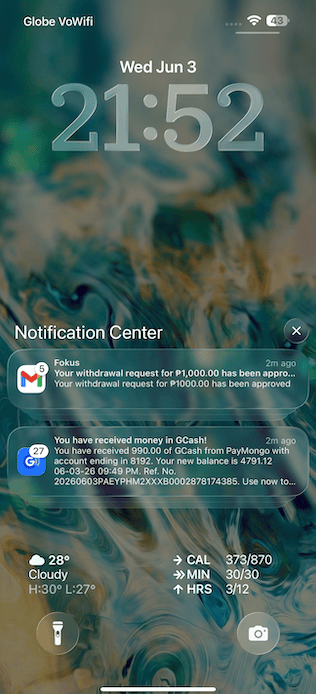
FAQ
How often can I withdraw?
How often can I withdraw?
As often as you want, as long as you have an available balance and have completed KYC. Each request has the ₱10 transfer fee, so most photographers batch their withdrawals weekly or monthly to save on fees.
Can I withdraw to someone else's account?
Can I withdraw to someone else's account?
No. The receiving account name must match the legal name on your verified KYC record. Withdrawals to third-party accounts are declined as part of our AML compliance.
My withdrawal has been 'approved' for a few days but the money hasn't arrived.
My withdrawal has been 'approved' for a few days but the money hasn't arrived.
Settlement timing depends on your receiving institution. Major banks can occasionally take 1–3 business days; smaller institutions can take longer. If it’s been more than 3 business days since approval, email [email protected] with the withdrawal request ID from the table — we’ll trace the disbursement with PayMongo.
Can I cancel a pending withdrawal request?
Can I cancel a pending withdrawal request?
Not from Studio itself. Once submitted, the request is queued for manual review. If you need to withdraw a request before review, email [email protected] before it is approved. Once approved, the transfer is in flight and can’t be cancelled — but if it fails, you’ll get an automatic reversal.
My request was declined — what do I do?
My request was declined — what do I do?
Read the decline reason in the withdrawals table. Common fixes: correct the receiving account number, switch to an institution that matches your KYC name, or contact support if the reason isn’t clear. You can submit a new request right after fixing the issue.
Related
Pending vs available balance
Understand the weekly cycle and when your sales become withdrawable.
Verify your identity (KYC)
KYC is required before your first withdrawal.