
Uploads locked? Your studio needs to be verified first. It’s a one-time, one-minute ID check — see photographer onboarding.
Join a collection
In order to contribute to a collection, a studio must click the Join Collection button first..png?fit=max&auto=format&n=tRZcvEHTdaD0igvm&q=85&s=a1c3275789beeb33e46a1a61245a530e)
The Upload Photos section inside a collection
Open the upload panel
Open your album from Collections in the sidebar, then scroll to the Upload Photos section at the bottom of the page..png?fit=max&auto=format&n=tRZcvEHTdaD0igvm&q=85&s=b00b21c6ff57db52674bd2de87ea056b)
The Upload Photos section inside a collection
Add your files
Drag your photos onto the dashed box, or click it to browse.Accepted formats: JPEG, PNG. RAW files (
.cr2, .nef, .arw, .dng) and folders aren’t supported — export to JPEG first. Anything unsupported is skipped automatically and you’ll see a note saying so.Review the queue
Your files land in a queue with a thumbnail, filename, and size each. Fokus computes a checksum for every file as it’s added, which is what lets it skip duplicates if you add the same photo twice. Remove anything you didn’t mean to add before you start. A badge at the top shows how many files are ready.Start the upload
Click Upload n files. A summary card shows live progress — percentage, speed, and estimated time remaining.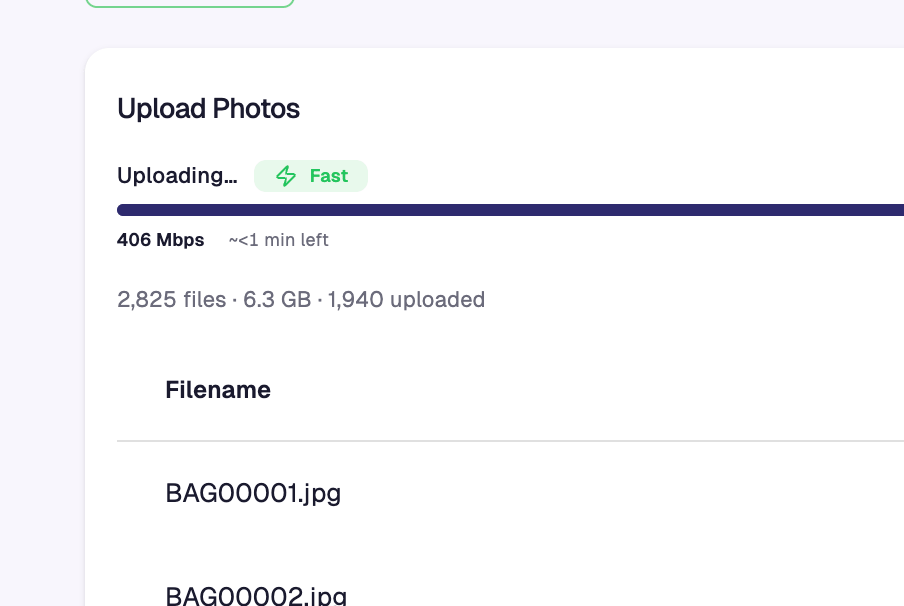
Upload in progress with live speed and ETA
Keep the tab open until it finishes. Anything that fails gets a Retry button — one per file, or Retry all failed at the top. Failed files keep their place in the queue, so nothing is lost.
What happens after upload
Watermarked
Every preview gets your watermark, using the settings from Settings → Watermark.
Faces detected
Buyers find themselves with a selfie — no scrolling through thousands of photos.
Bibs read
For races, Fokus reads bib numbers so runners can search by number.
You can then share your studio link by clicking the Get My Link button and sharing the copied link to your social media posts.
.png?fit=max&auto=format&n=tRZcvEHTdaD0igvm&q=85&s=264e543adb07bcee6fec6c75a009f748)
.png?fit=max&auto=format&n=tRZcvEHTdaD0igvm&q=85&s=4d6b9c9e9989319125bb86675e40fc3e)
Previews are rendered on request, so if you change your watermark later it applies to photos you’ve already uploaded — no re-upload needed.
Upload tips
Don't over-cull
Upload every usable frame. A buyer who appears in six photos often buys several.
Get the face clear
Face detection — and buyers — need a recognisable face. Wide scenery shots rarely sell.
Upload the same day
Most sales happen in the first 48 hours, while the event is still fresh.
Use a wired connection
For a multi-thousand-photo batch, ethernet beats hotel Wi-Fi by a wide margin.
Troubleshooting
The upload section isn't there at all.
The upload section isn't there at all.
Uploads are only open at certain collection statuses. A collection still Pending Approval can’t accept photos yet — wait for approval, then upload.
I see 'Uploads temporarily disabled'.
I see 'Uploads temporarily disabled'.
That’s a platform-wide pause, usually during maintenance. Nothing is wrong with your account — try again shortly.
Watch Folder is greyed out.
Watch Folder is greyed out.
Either your browser doesn’t support it (use Chrome or Edge) or your studio isn’t verified yet. Hover the button and the tooltip tells you which.
Some of my files were skipped.
Some of my files were skipped.
They were most likely RAW files or an unsupported format. Fokus accepts JPEG, PNG, WebP, and HEIC — export from your editor and re-add them. Folders can’t be dropped directly; select the files inside instead.
A few files failed near the end of a big batch.
A few files failed near the end of a big batch.
Usually a connection blip. Click Retry all failed — only the failed files re-upload.
My photos uploaded but look unprocessed.
My photos uploaded but look unprocessed.
Watermarking, face detection, and bib reading run after upload. Give it a few minutes on a large batch, then refresh.
Still stuck?
Still stuck?
Email [email protected] with your collection name and roughly how many files you were uploading.
Next step
Pending vs available balance
Your photos are live. Here’s how sales turn into money you can withdraw.